A few months ago I was looking into how to use Fbus with a Nokia phone but didn’t have much luck and instead just wired up the keypad. I decided to revisit Fbus and this time happened to find some AVR code which could send/receive SMS’s so now I’m able to send an SMS using the Arduino and I’ll explain how we do this.
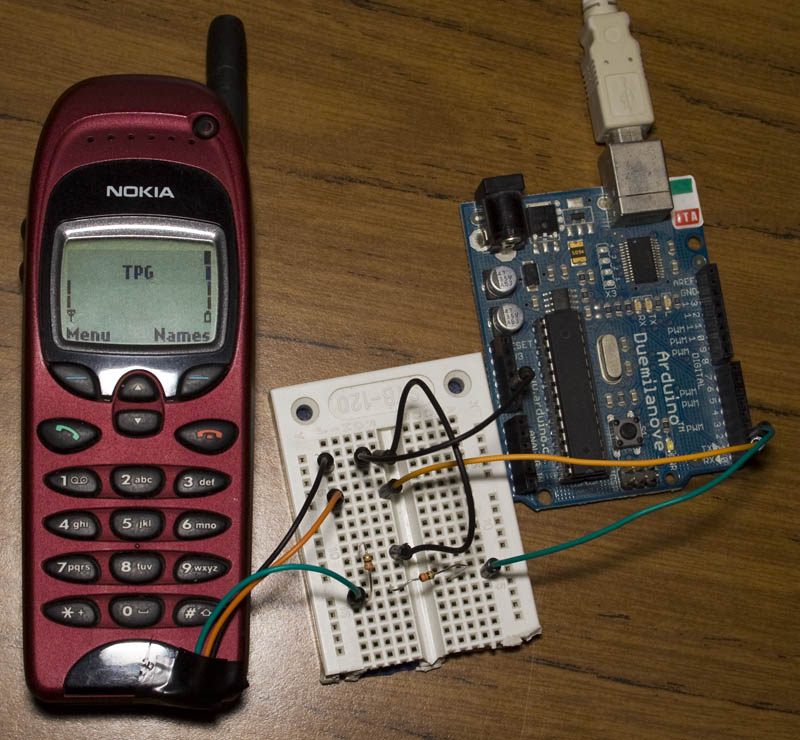
Before I go any further the 3 resources I used were:
Embedtronics – F-bus packet explanation with some examples of a packet
Avr and nokia3310 interface(sms) project on AVRfreaks – Code for an AVR to send/receive SMS
Gnokii – F-bus documentation and code to run on a computer
Firstly you need a Nokia phone which the F-bus commands are known, the best documentation is available for the Nokia 6110 and derivatives (Nokia 6130, 6150, 6190, 5110, 5130, 5150, 5190, 3210, 3310) – this was found in \gnokii-0.6.31\Docs\protocol\nk6110.txt
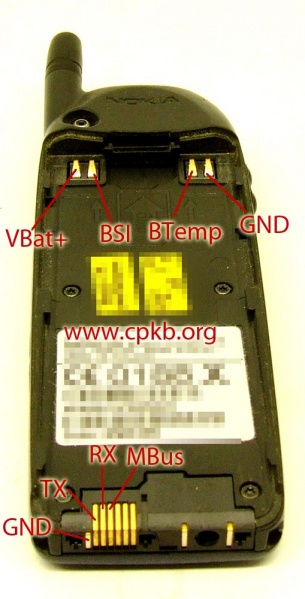
I was able to purchase a Nokia 6150 from Ebay for under $20. You can search up the Nokia pinout for your mobile phone – I found the TX, RX and GND for my phone.
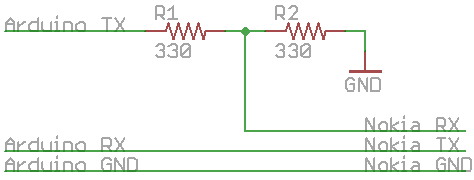
The F-bus protocol uses 115,200bps so we can easily use the Arduino’s serial function to communication with the phone. All you need to is hook up the phones TX to the Arduino’s RX and then use a resistor divider (I choose 330 ohm resistors) to connect the Arduino’s TX to the phones RX as shown above.
Understanding F-bus packets
So now we have it all hooked up and ready to go, we have to know the frame format which F-bus uses, the \gnokii-0.6.31\Docs\protocol\nokia.txt provides us with this. For my phone it was F-bus version 2.
Frame format for FBUS version 2/Direct IRDA:
{ FrameID, DestDEV, SrcDEV, MsgType, 0x00, FrameLength, {block}, FramesToGo,
 SeqNo, PaddingByte?, ChkSum1, ChkSum2 }

 where FrameID:   0x1c: IR / FBUS
                  0x1e: Serial / FBUS
 DestDev, SrcDev: 0x00: mobile phone
                  0x0c: TE (FBUS) [eg. PC]
 MsgType:         see List
 FrameLength:     {block} + 2 (+ 1 if PaddingByte exists)
 FramesToGo:      0x01 means the last frame
 SeqNo:           [0xXY]
                  X: 4: first block
                  0: continuing block
                  Y: sequence number
 PaddingByte:     0x00 if FrameLength would be an odd number anyways it doesn't exists
 ChkSum1:         XOR on frame's odd numbers
 ChkSum2?:        XOR on frame's even numbers
The Embedtronics website has an example packet which is sent to the phone requesting its hardware/software information and the phones reply with the explanation. I’ll try to combine all the information together in my explanation so you can hopefully understand where everything fits in.
Request phone’s hardware/software information (the data is in hex):
Byte: 00 01 02 03 04 05 06 07 08 09 10 11 12 13 14 15
Data: 1E 00 0C D1 00 07 00 01 00 03 00 01 60 00 72 D5
1E: Frame ID – this packet is being sent using F-bus
00: DestDev – this packet is being sent to the phone
0C: SrcDev – this packet is coming from F-bus
D1: MsgType – the type of message we are going to send/receive
If you check out \gnokii-0.6.31\Docs\protocol\nk6110.txt, it will say:
0xd1:
s Get HW&SW version { 0x0003, 0x00 }
So 0xD1 is the MsgType, the “s” stands for the command we send to the phone and “0x0003, 0x00” is the command we will send to the phone.
00 07: Frame length – the length of the data that follows, in this case it’s 7 bytes going from byte 06 to byte 12.
00 01: Unknown – even though Embedtronics website has an explanation it doesn’t make sense as the only time this appears is if we are sending/receiving data that isn’t an acknowledgement packet, so something to keep in mind. These bytes can be ignored.
00 03 00: Command – in this case we send the Get HW&SW version command as shown above.
01: Frames to go – since we aren’t sending the phone any other frames this is the last frame so we send 0x01 (this isn’t sent in an acknowledgement packet)
60: SeqNo – this is the sequence number we send to the phone, it will ignore the 6 but keep track of the 0. When we or the phone sends an acknowledge to each others packets, we need send back the sequence number we received. The sequence number is incremented for each new packet we send or receive that isn’t an acknowledgement and the sender/receiver have their own sequence numbers which overflow once they reach 3 bits (0, 1, 2, 3, 4, 5, 6, 7, 0, 1, etc)
00: Padding byte – Anything we send to the phone needs to have an even number of bytes, we add this to our packet to bring us up to 16 bytes total length.
72: Chksum1 – An XOR of all odd bytes up to the SeqNo
D5: Chksum2 – An XOR of all even bytes up to the SeqNo
We will take the reply from Embedtronics website:
1E 0C 00 7F 00 02 D1 00 CF 71

1E 0C 00 D2 00 26 01 00 00 03 56 20 30 34 2E 34 35 0A 32 31 2D 30 36 2D 30 31 0A 4E 48 4D 2D 35 0A 28 63 29 20 4E 4D
 50 2E 00 01 41 3F A4
The first frame is an acknowledgement from the phone to us saying it received our request.
1E 0C 00 – Destination and source are swapped around since the phone is now sending a frame back to us
7F: MsgType – the phone is sending us an acknowledgement packet
From nk6110.txt it says:
0x7f: Acknowledge(FBUS/IRDA){+type, seq }
Acknowledge(MBUS)…
00 02: Frame length – 2 bytes.
D1: Command – in this case “+type” is the Msgtype we sent the phone in the previous frame
00: SeqNo – the phone sends back the last number of our sequence number which was 0x60 so it sends back 0x00 (0x60 & 0x07, it only cares about the last 3 bits)
CF: Chksum1
71: Chksum2
The second frame is the information we requested.
1E 0C 00 – Destination and source are swapped around since the phone is now sending a frame back to us
D2: MsgType – the type of message
From nk6110.txt it says:
0xd2:
r Get HW&SW version { 0x0003 “V ” “firmware\n” “firmware date\n”
“model\n” “(c) NMP.” }
So 0xD2 is the MsgType, the “r” stands for the command we will receive from the phone and “0x0003” is the start of the hardware/software version.
00 26: Frame length – 38 bytes.
01 00: Unknown – looks like this time the unknown data is reversed, can be ignored
00 03: Command – in this case we receive the get HW&SW version
56 20 30 34 2E 34 35 0A 32 31 2D 30 36 2D 30 31 0A 4E 48 4D 2D 35 0A 28 63 29 20 4E 4D
50 2E 00: The HW&SW version which if you put in a hex editor reads as: V 04.45.21-06-01.NHM-5.(c) NMP..
01: Frames to go – last frame
41: SeqNo – the phone has generated it’s own sequence number
3F: Chksum1
A4: Chksum2
Now we have a chance to reply to the phone. If we don’t reply with an acknowledgement packet, the phone will try to send the information to us 3 times but it will still perform the action/command we sent it.
Let’s send a reply, from the Embedtronics website:
1E 00 0C 7F 00 02 D2 01 C0 7C
1E 00 0C – We are sending a frame to the phone
7F: MsgType – we are sending the phone an acknowledgement packet
00 02: Frame length – 2 bytes
D2: Command – in this case we acknowledge the phones message type it sent us in the previous frame
01: SeqNo – we send the phone its own sequence number which was 0x41 so we send back 0x01 (0x41 & 0x07)
C0: Chksum1
7F: Chksum2
Hopefully the above has given you an idea of how we send and receive information from the phone, let’s try this out on the Arduino now. Remember when programming the Arduino, you need to disconnect the phones TX/RX (pin 0 and 1) from the Arduino.
Sending the HW&SW version request
byte msg[] = {
0x1E, 0x00, 0x0C, 0xD1, 0x00, 0x07, 0x00, 0x01, 0x00, 0x03, 0x00, 0x01, 0x60, 0x00, 0x72, 0xD5 };

void setup() {
  Serial.begin(115200);
  delay(1000);
}

void loop() {
  // Initialise the F-bus
  for (int z = 0; z < 128; z++) {
    Serial.write(0x55);
  }
  Serial.println("");
  delay(100);

  // Send our command
  for (int x = 0; x < (sizeof(msg) / sizeof(byte)); x++) {
    Serial.write(msg[x]);
  }
  Serial.println("");

  // Wait for a reply
  while (1) {
    while (Serial.available() > 0) {
      int incomingByte = Serial.read();
      Serial.print(incomingByte, HEX);
      Serial.print(" ");
    }
  }
}
Download fbus_hw_sw_version. In this example, we have our message stored in an array, we initialise the F-bus by sending (0x55) “U” 128 times, send our command from the array, wait for a reply and we don’t send any acknowledgements back.
UUUUUUUUUUUUUUUUUUUUUUUUUUUUUUUUUUUUUUUUUUUUUUUUUUUUUUUUUUUUUUUUUUUUUUUUUUUUUUUUUUUUUUUUUUUUUUUUUUUUUUUUUUUUUUUUUUUUUUUUUUUUUUUU
1E C 0 7F 0 2 D1 0 CF 71
1E C 0 D2 0 26 1 0 0 3 56 20 20 35 2E 30 32 A 30 32 2D 30 32 2D 39 39 A 4E 53 4D 2D 31 A 28 63 29 20 4E 4D 50 2E 0 1 41 3C AE
1E C 0 D2 0 26 1 0 0 3 56 20 20 35 2E 30 32 A 30 32 2D 30 32 2D 39 39 A 4E 53 4D 2D 31 A 28 63 29 20 4E 4D 50 2E 0 1 41 3C AE
1E C 0 D2 0 26 1 0 0 3 56 20 20 35 2E 30 32 A 30 32 2D 30 32 2D 39 39 A 4E 53 4D 2D 31 A 28 63 29 20 4E 4D 50 2E 0 1 41 3C AE
Above we see the results – the 128 U’s we sent, the acknowledgement packet received and the HW&SW version received 3 times, notice that the single characters we receive back such as C, 0, are actually 0x0C, 0x00, etc. There will be random looking characters in-between the 128 U’s and the reply (that I can’t insert into wordpress), which is the command we sent.
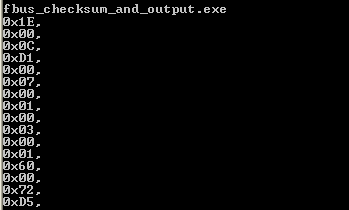
I have made a very basic C file fbus_checksum_and_output which can be used to calculate the checksum for any commands you want to send so you can easily modify the code above by just changing the msg array variable.
Sending an SMS
Now we can move on to sending an SMS. Using code provided from the AVRfreaks project, I was able to clean it up and modify it to only send an SMS and do nothing else.
To send an SMS we use:
0x02: SMS handling
s Send SMS message      { 0x0001, 0x02, 0x00 (SEND REQUEST), ... }
But I wasn’t able to find what SEND REQUEST meant which is where the reviewing the Embedtronics website helped find the SMS format.
unsigned char FBusFrame[200];
unsigned char SMSC[] = {0x07, 0x91, 0x16, 0x14, 0x91, 0x09, 0x00, 0xF1, 0x00, 0x00, 0x00, 0x00};
unsigned char RecipientNo[] = {0x0A, 0x81, 0x40, 0x21, 0x43, 0x65, 0x87};

void setup() {
  Serial.begin(115200);
  delay(100);
}

void loop() {
  // Initialise the Fbus by sending "U" 128 times
  for (int x = 0; x < 128; x++) {
    Serial.write("U");
  }

  // Send the SMS message
  SendSMS("Hi All. This message was sent through F-Bus. Cool!!");

  // Keep listening for a reply (we won't send any acknowledgements back)
  while (1) {
    ...
  }
}
We only really have to worry about 2 variables and the SMS message to send.The SMS center number is provided by your mobile phone provider which is relaying the SMS we send on to our recipient. The data in this case isn’t really hex but rather are the actual numbers and are back to front. The SMSC we are using would really read +61 411 990 001 (0x16 reads as 61, 0x14 reads as 41, etc). The same back to front format applies to the ReceipientNo which would really read as 0412 345 678
unsigned char SendSMS(const char *Message) {
  // Clear buffer
  unsigned char j = 0;
  memset(FBusFrame, 0, sizeof(FBusFrame));

  unsigned char MsgLen = strlen(Message), FrameSize = 0;
  unsigned char c, w, n, shift = 0, frameIndex = 0;
  unsigned char oddCheckSum, evenCheckSum = 0;

  // Encode the message into 7 bit characters
  for (n = 0; n < MsgLen; n++) {
    c = Message[n] & 0x7f;
    c >>= shift;
    w = Message[n+1] & 0x7f;
    w <<= (7-shift);
    shift += 1;
    c = c | w;
    if (shift == 7) {
      shift = 0x00;
      n++;
    }
    FBusFrame[frameIndex + MsgStartIndex] = c;
    frameIndex++;
}
FBusFrame[frameIndex + MsgStartIndex] = 0x01;
FrameSize = frameIndex + 44; // The size of the frame is frameIndex+48 (FrameIndex + 48 + 1 - 5)
We encode the SMS message which converts our 8bit ASCII into a 7bit because readable text in ASCII only ranges between 0 – 127 (7 bits) which means if our message starts off with “Hi”, the last bit of the “i” would be on the first bit of the “H”, the Embedtronics website explains this is more detail.
// Insert the frame values to prepare to send an SMS
FBusFrame[0] = 0x1E;
FBusFrame[1] = 0x00;
FBusFrame[2] = 0x0C;
FBusFrame[3] = 0x02;
FBusFrame[4] = 0x00;
FBusFrame[5] = FrameSize;
FBusFrame[6] = 0x00;
FBusFrame[7] = 0x01;
FBusFrame[8] = 0x00;
FBusFrame[9] = 0x01;
FBusFrame[10] = 0x02;
FBusFrame[11] = 0x00;

// Insert the SMS Center number
for (j = 0; j < sizeof(SMSC); j++) {
  FBusFrame[12 + j] = SMSC[j];
}

FBusFrame[24] = 0x15; // Message type
FBusFrame[28] = MsgLen; // Message length (uncompressed)

// Insert the Recipient number
for (j = 0; j < sizeof(RecipientNo); j++) {
  FBusFrame[j + 29] = RecipientNo[j];
}

FBusFrame[41] = 0xA7; // Validity period
We insert the usual starting frames to send an SMS, insert the SMS center number and the recipient number. The other things like message type, validity period,etc I didn’t bother to look into much because the Embedtronics website referred to the GSM spec so I took their word for it and assumed it’s all correct.
// Check if the Framesize is odd or even
if (FrameSize & 0x01) {
  frameIndex = FrameSize + 5;
  FBusFrame[frameIndex] = SeqNo;
  frameIndex++;\
  FBusFrame[frameIndex] = 0; // Insert to make the Frame even
  frameIndex++;
}
else {
  frameIndex = FrameSize + 5;
  FBusFrame[frameIndex] = SeqNo;
  frameIndex++;
}

// Calculate the checksum from the start of the frame to the end of the frame
for (unsigned char i = 0; i < frameIndex+2; i += 2) {
  oddCheckSum ^= FBusFrame[i];
  evenCheckSum ^= FBusFrame[i+1];
}
FBusFrame[frameIndex] = oddCheckSum;
FBusFrame[frameIndex+1] = evenCheckSum;

// Send the full frame to the phone
for (unsigned char j = 0; j < (frameIndex+2); j++) {
  // Debug to check in hex what we are sending
  //Serial.print(FBusFrame [j], HEX);
  //Serial.print(" ");

  Serial.write(FBusFrame [j]);
}
Now we just check if the frame is odd or even and insert a padding byte if needed, we also calculate the checksums and then send all the frames to the phone. If you want to see what it’s actually sending in hex you can uncomment the debug part. Download fbus_send_sms.
UUUUUUUUUUUUUUUUUUUUUUUUUUUUUUUUUUUUUUUUUUUUUUUUUUUUUUUUUUUUUUUUUUUUUUUUUUUUUUUUUUUUUUUUUUUUUUUUUUUUUUUUUUUUUUUUUUUUUUUUUUUUUUUU
1E C 0 7F 0 2 2 83 1C F2
1E C 0 2 0 9 1 8 0 2 64 35 0 1 40 0 3B 39
1E C 0 2 0 9 1 8 0 2 64 35 0 1 40 0 3B 39
1E C 0 2 0 9 1 8 0 2 64 35 0 1 40 0 3B 39
1E C 0 A 0 15 1 8 0 71 1 0 1 B 1 2 F2 D2 1A 3B 5 F5 20 0 0 1 41 0 FC 6A
1E C 0 A 0 15 1 8 0 71 1 0 1 B 1 2 F2 D2 1A 3B 5 F5 20 0 0 1 41 0 FC 6A
1E C 0 A 0 15 1 8 0 71 1 0 1 B 1 2 F2 D2 1A 3B 5 F5 20 0 0 1 41 0 FC 6A
1E C 0 A 0 15 1 8 0 71 1 0 1 B 1 2 F2 D2 1A 3B 5 F5 20 0 0 1 42 0 FF 6A
1E C 0 A 0 15 1 8 0 71 1 0 1 B 1 2 F2 D2 1A 3B 5 F5 20 0 0 1 42 0 FF 6A
1E C 0 A 0 15 1 8 0 71 1 0 1 B 1 2 F2 D2 1A 3B 5 F5 20 0 0 1 42 0 FF 6A
We receive the reply from the phone. First it sends the acknowledgement packet and a few seconds later it sends the rest.
If you wanted to listen to make sure the SMS was successfully sent you would look at:
0x02: SMS handling
r Message sent { 0x0002 }
Which is found at in the text above at: 1E C 0 2 0 9 1 8 0 2
Interestingly it also sends us the network status 6 times after that:
0x0a: Network status
r network registration { 0x0071, ?,?,?,length,netstatus,netsel,cellIDH,cellIDL,lacH,lacL,netcode,netcode,netcode }
So that’s all there is to know and now we know to send an SMS! The next step is to move away from the Arduino, we’ll need dedicated USART which the ATtiny2313A and 4313 have so I might pick one of those up and see how it goes. If I can get that working then this can replace the Nokia Keypad SMS Sender that I have connected to my alarm system.
Edit 17/03/13: I found that you can only send 1 SMS with the code above. Trying to send a second SMS only gives back an acknowledgement of the packet we sent but not the SMS itself. After lots of testing, I found that you should firstly send 128 ‘U’, then send the request for the HW&SW command and then send the SMS.
[…] to get started, hit eBay for those old Nokias – then click here for Alex’s project. And for more, we’re […]
[…] his website, he provides a detailed tutorial on how to use an old Nokia 6110 (or any derivatives) to send SMS […]
[…] his website, he provides a detailed tutorial on how to use an old Nokia 6110 (or any derivatives) to send SMS […]
Hi,
Can i use a nokia 1100 handset instead of the 3310? I tried flashing your code but nothing seems to happen. I was able to speed dial from the phone, using another code via a uno board. But i can’t send sms or get proper reply for hw-sw request . Please help.
Thank You.
hey…can u tell me the source of your code through which you were able to speed dial
Hello, very interesting work, congratulation.
One question on the resistor that you use on Arduino_TX and Nokia_RX, why do you use the resistor? Can I connect directly Arduino TX/RX to Nokia RX/TX?
Hi,
You shouldn’t connect them together, if you do you are very likely to damage the Nokia phone. As the Arduino is running at 5V we need to reduce this to the voltage the Nokia phone is running at, which is around 3.6V. The two resistors are used as a resistor divider which reduces the voltage to 2.5V.
[…] Via: Arduino Blog, Source: InsideGadget […]
[…] TYM adresem znajdziecie opis – jak wysyłać SMS-y z telefonu komórkowego Nokia 6130 (6150, […]
[…] Pod TYM adresem znajdziecie opis – jak wysyłać SMS-y z telefonu komórkowego Nokia 6130 (6150, 6190, 5110, 5130, 5150, 5190, 3210, 3310) poprzez protokół F-bus z wykorzystaniem Arduino. […]
[…] Now you can use one for your next Arduino project. Alex of insideGadgets has kindly posted a detailed tutorial showing how to hack and old Nokia 6110 (or any derivative) to send text messages from an Arduino. […]
[…] See on http://www.insidegadgets.com […]
[…] Vous pourrez retrouver tous les détails pour l’expérimenter sur insidegadgets.com […]
Thanx Alot Allex. Iam working with the same phone in Uganda and i want to be able to send system status messages with the Nokia 3310. i have tried using your program but the phone can’t really send any messages. M thinking that the problem could with the phone numbers am using cuz for the smsc i’ve used 0x07, 0x91,0x52,0x6, 0x07, 0x4, 0x09, 0x21, 0x16, 0xF1, 0x00, 0x00, 0x00, 0x00 for the number +256-704901261
and for the receipient i have used 0x0A, 0x81, 0x70, 0x00, 0x66, 0x46, 0x64 for 0700666440 pliz help me cuz am almost at the virgue of completing the project.
Hi Mugabe,
Could you double check the numbers and the 0x equivalents?
I ask because you have 0×6 which should be 0×76 (no need for a blank for the ” – “), 0x07 should be 0x40 and so on.
I found this list of SMSC numbers – http://smsclist.com/downloads/default.txt
+256 Uganda
+256700000088 Waridtel
+25671000050 Uganda Telecom & TeleChoice
+25675010004 Zain
+25677110005 MTN
Is your provider any of these?
Alex, iam really so greatful for your help, my project finally worked.
Good to hear 🙂
Hi.Mugabe . i really need your help. am working on a final year projeect due for presenation on 5th june but cannot rightly setup GSM connectivity using nokia 3310 and the arduino uno. i have setup the physical circuit. i want you to help me the right hex equivalent of equivalent of sms centre number for mtn Uganda (+256771100020). will be grateful for any assistance rendered. Paul S.
the smsc is +9232100006001 corrections
[…] – http://www.insidegadgets.com/2013/01/12/how-to-use-nokia-f-bus-to-send-an-sms-message/ […]
Hi there, thank you for all this awesome “tut”, I made great progress working with my 3310.
Still playing to check if everything works before I go any further, but i have some trouble in your code.
// Check if the Framesize is odd or even
if […]
FBusFrame[frameIndex] = SeqNo;
[…]
What’s SeqNo for? How can i initialize it? i read again and again your post and embedelectronics’s post, but i can’t manage to make the entire thing work and send my first sms ^^
Could someone give me a little hand please?
Hi Shini,
In the scheme of things the SeqNo isn’t that important, it just allows each side to identify if the data we are sending is new or is a continuation of the packet we have sent before or we are sending an ack back (you don’t have to send an ack back to send an SMS). You can leave SeqNo as is.
Are you receiving any data back from the phone? Do you receive the HW & SW info?
Hi Alex, thanks for your fast answer 🙂
The problem with SeqNo is that it’s not initiate (i tried things like “unsigned char SeqNo”, but not shure if it’s the right thing or not.. but if I leave it as is, then the code won’t compile. (I’m working with an Arduino Uno rev3 & Leonardo)
I’m receiving data back! since I used this : http://www.semageek.com/diy-comment-envoyer-des-sms-avec-un-arduino-sans-se-ruiner/ (just before I found your link ^^), with the first part of code.
Then when i try to use sendSMS(); , i have weird chars coming out first, then some things… and as i said, i can’t execute the complete example code without a bug (coming from this SeqNo)
Hi Shino,
Yes it should be unsigned char for the SeqNo.
Can you paste what you receive back?
Also try uncommenting these serial.print lines to see what you are sending:
// Debug to check in hex what we are sending
//Serial.print(FBusFrame [j], HEX);
//Serial.print(” “);
Hi,
Your tut is really helpful, but I really wanted to use my 3310 to receive SMS and I can’t figure how. Have you tried anything ? From what I understand from the Embedtronics link you mentioned (http://www.embedtronics.com/nokia/fbus.html#part4) , I only need to watch for any serial communication coming from the phone, as it’s supposed to send the received SMS on the FBus. I tried something like this, but without success :
void setup() {
Serial.begin(115200);
delay(1000);
}
void loop() {
// Initialise the F-bus
for (int z = 0; z 0) {
int incomingByte = Serial.read();
Serial.print(incomingByte, HEX);
Serial.print(” “);
}
}
}
Do you have any advice to give me ?
Thanks
Sorry looks like I screwed the copy/paste :
void setup() {
Serial.begin(115200);
delay(1000);
}
void loop() {
// Initialise the F-bus
for (int z = 0; z 0) {
int incomingByte = Serial.read();
Serial.print(incomingByte, HEX);
Serial.print(” “);
}
}
}
Ok so that’s not me, I can’t figure why but some of the code is lost when I post it x). Anyways, that’s only the //Initialise the F-Bus part you gave in your tutorial, so I’m pretty sure I had this part good. Also sorry for the spam ^^
Hi Seveen,
Could you post the code in pastie.org?
Try this:
// Initialise the Fbus
for (int z = 0; z < 128; z++) { Serial.write(0x55); } while (Serial.available() > 0) {
int incomingByte = Serial.read();
Serial.print(incomingByte, HEX);
Serial.print(” “);
}
Yeah that’s exactly what I tried.
But I cant manage to get an answer from the phone. Anyways thank you for your reply.
Hi,
Can i use a nokia 1100 handset instead of the 3310? I tried flashing your code but nothing seems to happen. I was able to speed dial from the phone, using another code via a uno board. But i can’t send sms or get proper reply for hw-sw request . Please help.
Thank You.
Hi Shyama,
I’m not sure if it will work as only these models are known to work at the moment:
GSM/PCN Nokia 6110 and derivatives (Nokia 6130, 6150, 6190, 5110, 5130, 5150,
5190, 3210, 3310)
GSM Nokia 2110
NMT Nokia 640
TDMA NOKIA 5120 / 5160 / 6120 / 6160
CDMA Nokia 6185
GSM Nokia 6510
GSM Nokia 6210 and derivatives (7110)
Hi
I’m using your send sms code with a 3310 but I can’t seem to get tit to send an SMS.
How do I get it to set the sms centre number as +447802002606
unsigned char SMSC[] = {0x08, 0xa1, 0x44, 0x87, 0x20, 0x00, 0x00, 0x62, 0x60}; yes?
Btw am able to get it to show my hardware version number.
Hi Steven,
Try this one:
unsigned char SMSC[] = {0x07, 0x91, 0x44, 0x87, 0x20, 0x00, 0x62, 0x60, 0x00, 0x00, 0x00, 0x00};
Good morning,
I have developped a buglar alarm using NOKIA 3310 FBUS, controlled with PIC16F628.
All is ok.
To preserve the battery life of the alarm, i want to switch off the key led and the LCD.
My question is if there is a FBUS command to do that.
Thanks for your help.
Best regards.
Jean-Luc.
Hi Jean-Luc,
From what I can see there doesn’t seem to be any commands to switch off the key led or LCD. For the key LED – maybe there is an option in the profile setting? For the LCD as long as you don’t need to see anything, you should be able to remove it from the phone.
Hello, I learnt a lot of things reading your article and related links but I’m getting stuck:
I can communicate with the 3310 thanks to FBUS command but the answer doesn’t match with what I expected. I use 2 serial ports : the native one to comunicate between arduino and computer, and a software one to comunicate between nokia and arduino.
Here is the output of my program:
I don’t understand why the response from the nokia doesn’t corresponds to what you explain in your blog.
Do you have any advice for me?
Thanks for your attention
===== Program output (I did 3 reset to get more trames)======
Hello
UUUUUUUUUUUUUUUUUUUUUUUUUUUUUUUUUUUUUUUUUUUUUUUUUUUUUUUUUUUUUUUUUUUUUUUUUUUUUUUUUUUUUUUUUUUUUUUUUUUUUUUUUUUUUUUUUUUUUUUUUUUUUUUU
1E 0 C D1 0 7 0 1 0 3 0 1 60 0 72 D5
wait for answer
8E 43 D0 1 81 34 D0 97 39 86 20 1E 48 A 1 40 90 5 C1 5A 35 AA 19 49 A6 5 9A 55 48 26 C8 45 9B AD 25 10 29 D4 28 D4 2 59 40 A0 14 AE 8E 43 90 E 24 2 0 80 90 A C2 69 57 D3 2A 64 99 27 53 B6 60 91 41 84 6A 55 9B 42 D5 2A 82 99 A7 74 5 A 85 9C FB 8E 43 90 E 24 2 0 80 90 A C2 69 97 D3 2A 53 0 4 A 81 80 4 FF 2 0 80 90 A C2 69 97 D3 2A 64 99 27 53 B6 60 91 41 84 6A 55 9B 42 D5 2A 82 99 A7 74 5 A 85 9C FB 2A 64 99 27 8E 43 90 4 6A 5 84 A0 56 8 14 2E 80 90 3 87 5E 10 81 40 Hello
UUUUUUUUUUUUUUUUUUUUUUUUUUUUUUUUUUUUUUUUUUUUUUUUUUUUUUUUUUUUUUUUUUUUUUUUUUUUUUUUUUUUUUUUUUUUUUUUUUUUUUUUUUUUUUUUUUUUUUUUUUUUUUUU
1E 0 C D1 0 7 0 1 0 3 0 1 60 0 72 D5
wait for answer
8E 43 D0 1 81 34 D0 97 3C 8C 40 1D 68 2 0 80 90 5 C3 DA 35 55 8A 4D A7 4 DA 59 98 2C 91 5 95 AB 49 4 8A 53 50 D4 2 59 80 A0 4C A6 8E 43 90 E 24 2 0 80 90 A C2 69 97 52 C9 94 E5 96 AC 52 9 45 82 53 69 D4 55 8A 48 56 9 3A 1A A0 4B 20 68 A5 8A 8E 43 90 E 24 2 0 80 90 A C2 69 57 D3 2A AC Hello
UUUUUUUUUUUUUUUUUUUUUUUUUUUUUUUUUUUUUUUUUUUUUUUUUUUUUUUUUUUUUUUUUUUUUUUUUUUUUUUUUUUUUUUUUUUUUUUUUUUUUUUUUUUUUUUUUUUUUUUUUUUUUUUU
1E 0 C D1 0 7 0 1 0 3 0 1 60 0 72 D5
wait for answer
8E 43 90 4 6A 5 84 A0 56 8 14 2D 40 90 13 3D BA 41 BF 10 4 A 81 80 22 F4 8E 43 D0 1 81 34 D0 97 8F 23 90 E 34 7 C0 A0 90 5 C2 69 8E 93 29 92 A6 5 9A 55 48 26 C8 45 9B 56 25 10 29 8E 43 90 E 24 2 0 80 90 A C2 69 57 D3 2A 64 99 27 53 B6 60 91 41 84 6A 55 9B 42 D5 2A 82 99 A7 74 5 A 85 43 8 24 2 0 80 FF
=====================
Mehdi
Hi Mehdi,
I haven’t seen that happen before but the output is sort of consistent. You mentioned that you use 2 serial ports, can you just try using 1 serial port instead of 2 – hook it up to the Arduino (pin 0 and 1)?
Hi, thanks for your answer.
I already tested that before but I get problem uploading firmware and with the arduino serial monitor. But, but… That was the problem, I finally get the software version!
So many thanks!
Next step, SMS 🙂
Mehdi
Hi once more,
As I’m not able to comunicate with the nokia 3310, I’m trying to use your code to send SMS. For what I understand, I changed the SMSC number to
SMSC[] = {0x07, 0x91, 0x33, 0x06, 0x09, 0x10, 0x93, 0x00, 0x00, 0x00, 0x00, 0x00}; for the french SFR operator (+33 60 90 01 39 0)
and the destination number to +33 6 87 77 28 75
RecipientNo[] = {0x0A, 0xA1, 0x60, 0x78, 0x77, 0x82, 0x57};
But the phone doesn’t answer anything
Here is the decoded frame sent by your script
FrameType : cable
computer ==> phone
Command : 2 => sendSms
data : header => 0, 1, 0
,
sendSms => 1, 2, 0
,
smsc => 91, 33, 6, 9, 10, 93, 0, 0
,
tpduMessageType => 0x0,
tpduMessageReference => 0x0,
tpduProtocolId => 0x0,
tpduDataCoding => 0x15,
tpduMessageSize => 0x0,
destPhone => 0
,
validityPeriod => 0x33,
serviceTimeStamp => a, a1, 60, 78, 77, 82, 57, 0
,
raw : 0x1e, 0x0, 0xc, 0x2, 0x0, 0x59, 0x0, 0x1, 0x0, 0x1, 0x2, 0x0, 0x7, 0x91, 0x33, 0x6, 0x9, 0x10, 0x93, 0x0, 0x0, 0x0, 0x0, 0x0, 0x15, 0x0, 0x0, 0x0, 0x33, 0xa, 0xa1, 0x60, 0x78, 0x77, 0x82, 0x57, 0x0, 0x0, 0x0, 0x0, 0x0, 0xa7, 0x0, 0x0, 0x0, 0x0, 0x0, 0x0, 0xc8, 0x34, 0x28, 0xc8, 0x66, 0xbb, 0x40, 0x54, 0x74, 0x7a, 0xe, 0x6a, 0x97, 0xe7, 0xf3, 0xf0, 0xb9, 0xc, 0xba, 0x87, 0xe7, 0xa0, 0x79, 0xd9, 0x4d, 0x7, 0xd1, 0xd1, 0xf2, 0x77, 0xfd, 0x8c, 0x6, 0x19, 0x5b, 0xc2, 0xfa, 0xdc, 0x5, 0x1a, 0xbe, 0xdf, 0xec, 0x50, 0x8, 0x1, 0x43, 0x0, 0xfb,
<<<<<<<<<<<<<<<<
Do you have any suggestion for me?
Thanks anyway once more,
Mehdi
Hi Mehdi,
I thought you did end up receiving good data from your phone? Do you receive anything back from the phone?
Try changing RecipientNo[] = {0x0A, 0xA1, 0×60, 0×78, 0×77, 0×82, 0×57} to
RecipientNo[] = {0x0A, 0xA1, 0×06, 0×78, 0×77, 0×82, 0×57}
And perhaps try using 0x81 instead of 0xA1.
Hi, i made a mistake in the previous post: my phone is talking. At least, it send me the HS version 🙂
When i’m trying to send an sms, it response me the ack
1e 0c 00 7f 00 02 02 80 1c f1, so for me, everything is ok, but the receiver never receive it.
Do you know what does it means? I can’t find any information on the gnooki file…
Thanks once more!
Mehdi
Hi!
I finally get it working thanks to a library!
http://www.affinix.com/~justin/nokia/n61sms.c
Maybe it could be useful to someone else 🙂
Anyway, thanks for your help!
Mehdi
Hi Mehdi,
Thanks for posting that, I’m sure it will be helpful for someone else.
Nice work. Got lots of things from your tutorial………
Thaks Alex.
[…] library. Sources can be found Nokia3310_sendSmsSerial The hardware schematic can be found on the embedtronics.com […]
hi,
i am interested with How to use Nokia F-bus to send an SMS message…
and i wanted my nokia 105 to inteface with my arduino uno or to my arduino mega,
from where on Nokia 105 circuit board can i hook up my arduino?
the circuit board of nokia 105 can be found in this webpage…..
http://b.q12w.net/file/NOKIA-105.jpg
ric
Hi Ric,
Here is a picture I found of the Fbus connection – http://forum.gsmhosting.com/vbb/f609/nokia-105-rm-908-fbus-pinout-1665918/
But the chances are that the Gnokii way of communicating to this phone may not work but worth a go I guess.
The Embedtronics links are broken. Do you have an updated link?
Found it on the Wayback Machine:
http://web.archive.org/web/20130515010146/http://www.embedtronics.com/nokia/fbus.html
I found a Nokia 6190 on ebay and a Nokia DAU-9P data cable that fits the bottom of the phone. I’m starting to suspect that the data cable has some circuitry in it that converts the phone signals to RS232. Do you know if that is the case, and if so, how would I modify the connection from the data cable to the Arduino? Would I still need the voltage divider between the Nokia Rx and and Arduino Tx?
Hi 8bar,
Yes I would suspect that’s the case, probably the MAX232 which a lot of others have.
It depends what you’d like to do, you could just solder your own wires to the end connector like I did and use the resistor divider for the Arduino TX – pin out here http://pinouts.ru/CellularPhones-Nokia/nokia_5110_6110_pinout.shtml.
If you wanted to keep the cable then you cut it and hope that the RS232 circuit is on the PC connector (because it looks larger than usual) and then use the wires that way.
Lastly if you wanted to keep the wire as is, then you’d need to use a MAX232 from the Arduino to the cable.
Easiest option is number 1 or 2.
Oops, see my response two messages down.
I have a Nokia 6030.which series of phones should I choose from gnokii.org (Nokia 6510 or 7110 or 6110 or 3810 or 2110 series).Even I want this because of my security system project that will alert me of any intrusions.
Hi Kathir, I would say to try the 6110 first.
Although the gnokii site doesn’t list the 6030, it does list the 6020 under the 6510 series, which makes it appear to be the closest match.
Thanks for the feedback, Alex. I like option 2 (so I don’t have to solder directly to the phone, nor add the complexity of the MAX232). The phone connector end of the cable is easily opened with screws, and it appears that there is no RS232 circuit there. The spring loaded contacts emerge from a small rectangular housing about 1/4″ x 3/8″ x 3/8″ in size, and the cable wires attach to the other end. I suppose if tiny surface mount components are used, it could be hidden inside there. Maybe a continuity checker would answer that.
hello , 🙂
i have i nokia 2300 … can this model phone support with this project…???
how about coding arduino?
thank you,
ISZ
Hi, I’m not really sure but always worth trying it out. Here is the list that has been tested – http://wiki.gnokii.org/index.php/Config#Tested_phones
[…] ? […]
0×07, 0×91,0×52,0×6, 0×07, 0×4, 0×09, 0×21, 0×16, 0xF1, 0×00, 0×00, 0×00, 0×00 for the number +256-704901261
and for the receipient i have used 0x0A, 0×81, 0×70, 0×00, 0×66, 0×46, 0×64 for 0700666440
what about this number what is the equivalent?
+63 Philippines
+639170000017 Globe telecom
+639220001501 Sun
sender number is
+0639339874731
and for the receipient is
+639204790857
Hi Ric,
It would be:
+0639339874731
{0x08, 0x91, 0x60, 0x93, 0x33, 0x89, 0x47, 0x37, 0x01, 0x00, 0x00, 0x00}
0x08 – because the number is 8 bytes long
or it could be {0x07, 0x91, 0x36, 0x39, 0x93, 0x78, 0x74, 0x13, 0x00, 0x00, 0x00, 0x00}
+639204790857
{0x0A, 0x81, 0x36, 0x29, 0x40, 0x97, 0x80, 0x75}
hi
the cellphone that attached to my arduino is nokia 3310 cellnumber is 9204790857 smart gold and i want to send messages from nokia 3310 with arduino board code to my samsung cellphone number 0933987473 sun…..so my sketchcode is
unsigned char SMSC[] ={0x07,0x91,0x36,0x29,0x02,0x00,0x51,0x10,0x00,0x10,0x1B,0x00,0x04};
////// 09 33 98 74 73 1
unsigned char RecipientNo[] = {0x0C,0x91,0x60, 0x93, 0x33, 0x89, 0x47, 0x37, 0x01};
nothing happen…
Try this:
SMSC: {0×07,0×91,0×36,0×29,0×02,0×00,0×51,0×10,0×00, 0x00, 0x00, 0x00};
or SMSC: {0×07,0×91,0×36,0×29,0×02,0×00,0×51,0×10,0x0F, 0x00, 0x00, 0x00};
RecipientNo[] = {0x0A, 0x81, 0×93, 0×33, 0×89, 0×47, 0×37, 0×01};
or RecipientNo[] = {0x0A, 0x81, 0×60, 0×93, 0×33, 0×89, 0×47, 0×37, 0×01};
Can you show a picture of how you achieved the connections to the f bus pinout of the mobile phone ? Did you solder the wires to the f bus pinout of the mobile phone ? And how did you manage to insert the phone battery after making the f bus connections ?
I soldered the wires to the end of the connectors – near where the power plug goes, by doing that it doesn’t block the battery.
unsigned char SMSC[] = {0x07,0x91,0x36,0x29,0x02,0x00,0x51,0x10,0x00,0x10,0x1B,0x04};
unsigned char RecipientNo[] = {0x0C,0x91,0x36,0x39,0x93,0x78,0x74,0x13};
the above number is now working for my nokia 3310 and the arduino, it send messages to my sumsung phone but the problem is that it takes too long or sometimes it will not send messages can i have to adjust the
// Insert the frame values to prepare to send an SMS
FBusFrame[0] = 0x1E;
FBusFrame[1] = 0x00;
FBusFrame[2] = 0x0C;
FBusFrame[3] = 0x02;
FBusFrame[4] = 0x00;
FBusFrame[5] = FrameSize;
FBusFrame[6] = 0x00;
FBusFrame[7] = 0x01;
FBusFrame[8] = 0x00;
FBusFrame[9] = 0x01;
FBusFrame[10] = 0x02;
FBusFrame[11] = 0x00;
what will is this normal? too long to reach the messages…
That part is all normal, what you have to do is listen back for the replies to see if the SMS was sent or not.
Alex, very interesting, but I’m not sure I understand it all just yet.
I’m trying out the fbus_hw_sw_version sketch.
When using the hardware serial on the Arduino to the Nokia, should I be seeing readable return hex text in the serial monitor?
I do get something, but all unreadable characters, not the HEX codes.
I’m using a Nokia 6310i wit an Arduino Ethernet.
Hi Koen,
Yes you should receive the hex codes back.
Check that your baud rate on the Arduino serial monitor is set to 115200.
Thx, Alex. I should have known. 😉
[…] Links Nokia AT-Commands FBUS-communications-with-arduino Arduino-power-failure-alarm Insidegadgets.com: how-to-use-nokia-f-bus-to-send-an-sms-message […]
“Edit 17/03/13: I found that you can only send 1 SMS with the code above. Trying to send a second SMS only gives back an acknowledgement of the packet we sent but
Firstly, I want to say thank you for your publication.
I am currently also doing a small project on the use of Nokia 3310. The experiments found that to send more than one SMS you need to do the following.
The first package to your phone must have SeqNo = 0x60. Subsequent 41,42, … 47, 40, ….., etc.
In this case, you can not send a request to HW & SW.
Thanks again.
Hi,
I try to send SMS via NOKIA 5110 using your script, unfortunetly I can not do it, my numbers are:
+48601000351
SMSC{0×07, 0×91, 0×84, 0×06, 0×01, 0×00, 0×53, 0×01, 0×00, 0×00, 0×00, 0×00};
+48502582751
RecipientNo{0x0A, 0x81, 0x50, 0x20, 0x85, 0x72, 0x15};
Below what I am getting as a reply from telephone:
1E C 0 7F 0 2 2 83 1C F2
1E C 0 A 0 15 1 8 0 71 1 0 1 B 1 2 8D 2E A0 2E 62 F0 10 0 0 1 40 0 1 92
1E C 0 A 0 15 1 8 0 71 1 0 1 B 1 2 8D 2E A0 2E 62 F0 10 0 0 1 40 0 1 92
1E C 0 A 0 15 1 8 0 71 1 0 1 B 1 2 79 19 A0 2E 62 F0 10 0 0 1 41 0 F4 A5
1E C 0 A 0 15 1 8 0 71 1 0 1 B 1 2 79 19 A0 2E 62 F0 10 0 0 1 41 0 F4 A5
1E C 0 A 0 15 1 8 0 71 1 0 1 B 1 2 79 19 A0 2E 62 F0 10 0 0 1 41 0 F4 A5
1E C 0 A 0 15 1 8 0 71 1 0 1 B 1 2 79 19 A0 2E 62 F0 10 0 0 1 42 0 F7 A5
1E C 0 A 0 15 1 8 0 71 1 0 1 B 1 2 79 19 A0 2E 62 F0 10 0 0 1 42 0 F7 A5
1E C 0 A 0 15 1 8 0 71 1 0 1 B 1 2 79 19 A0 2E 62 F0 10 0 0 1 42 0 F7 A5
1E C 0 A 0 15 1 8 0 71 1 0 1 B 1 2 79 19 A0 2E 62 F0 10 0 0 1 43 0 F6 A5
1E C 0 A 0 15 1 8 0 71 1 0 1 B 1 2 79 19 A0 2E 62 F0 10 0 0 1 43 0 F6 A5
1E C 0 A 0 15 1 8 0 71 1 0 1 B 1 2 79 19 A0 2E 62 F0 10 0 0 1 43 0 F6 A5
1E C 0 A 0 15 1 8 0 71 1 0 1 B 1 2 8D 2E A0 2E 62 F0 10 0 0 1 44 0 5 92
1E C 0 A 0 15 1 8 0 71 1 0 1 B 1 2 8D 2E A0 2E 62 F0 10 0 0 1 44 0 5 92
1E C 0 A 0 15 1 8 0 71 1 0 1 B 1 2 8D 2E A0 2E 62 F0 10 0 0 1 44 0 5 92
1E C 0 A 0 15 1 8 0 71 1 0 1 B 1 2 8D 2E A0 2E 62 F0 10 0 0 1 45 0 4 92
1E C 0 A 0 15 1 8 0 71 1 0 1 B 1 2 8D 2E A0 2E 62 F0 10 0 0 1 45 0 4 92
1E C 0 A 0 15 1 8 0 71 1 0 1 B 1 2 8D 2E A0 2E 62 F0 10 0 0 1 45 0 4 92
1E C 0 A 0 15 1 8 0 71 1 0 1 B 1 2 8D 2E A0 2E 62 F0 10 0 0 1 46 0 7 92
1E C 0 A 0 15 1 8 0 71 1 0 1 B 1 2 8D 2E A0 2E 62 F0 10 0 0 1 46 0 7 92
1E C 0 A 0 15 1 8 0 71 1 0 1 B 1 2 8D 2E A0 2E 62 F0 10 0 0 1 46 0 7 92
1E C 0 A 0 15 1 8 0 71 1 0 1 B 1 2 8D 2E A0 2E 62 F0 10 0 0 1 47 0 6 92
1E C 0 A 0 15 1 8 0 71 1 0 1 B 1 2 8D 2E A0 2E 62 F0 10 0 0 1 47 0 6 92
1E C 0 A 0 15 1 8 0 71 1 0 1 B 1 2 8D 2E A0 2E 62 F0 10 0 0 1 47 0 6 92
1E C 0 A 0 15 1 8 0 71 1 0 1 B 1 2 79 19 A0 2E 62 F0 10 0 0 1 40 0 F5 A5
1E C 0 A 0 15 1 8 0 71 1 0 1 B 1 2 79 19 A0 2E 62 F0 10 0 0 1 40 0 F5 A5
1E C 0 A 0 15 1 8 0 71 1 0 1 B 1 2 79 19 A0 2E 62 F0 10 0 0 1 40 0 F5 A5
1E C 0 A 0 15 1 8 0 71 1 0 1 B 1 2 79 19 A0 2E 62 F0 10 0 0 1 41 0 F4 A5
1E C 0 A 0 15 1 8 0 71 1 0 1 B 1 2 79 19 A0 2E 62 F0 10 0 0 1 41 0 F4 A5
1E C 0 A 0 15 1 8 0 71 1 0 1 B 1 2 79 19 A0 2E 62 F0 10 0 0 1 41 0 F4 A5
It would be great if you can help me with this.
Hi Again,
I tried also like below
unsigned char SMSC[] = {0x07, 0x91, 0x84, 0x06, 0x01, 0x00, 0x53, 0xF1, 0x00, 0x00, 0x00, 0x00};
but still not working, any Chance for help from you Alex ?
Hi,
Could you double check your recipient number?
I think it should be: RecipientNo{0x0A, 0×81, 0×05, 0×52, 0×28, 0×57, 0×01};
Hi Alex,
I have found mistake already and now it is working very well, now I am trying to figure out how to receive SMS, maybe you have such code ? If so will you be so kind and share it here 🙂 ?
Hi Grzegorz,
I haven’t looked at receiving SMS’s yet but the best bet would be to look at the original source which I used and compacted it down – http://www.avrfreaks.net/index.php?module=Freaks%20Academy&func=viewItem&item_id=3326&item_type=project
hi Alex
thanks for the tutorial on Fbus.
i am using miKroC compiler but the codes are compiling with errors. how can i change this codes to compile with mikroC
i am doing a project on gsm remote control systems using nokia 3310 fbus and pic16F877A. i have read a lot of documentation on F bus protocol and i am unable to use a source code to write an sms in ascii then pack and send in hex. so i write a frame in hex and try to send the frame to my phone but i have a problem with calculating odd and even checksum. for example the frme below is to send the msg “HEATER ON” to the number “70596947” and the sms center is +23779000002(MTN Cameroon).0x1E, 0x00, 0x0C, 0x02, 0x00, 0x58, 0x00, 0x01, 0x00, 0x01, 0x02, 0x00, 0x07, 0x91, 0x32, 0x77, 0x09, 0x00, 0x00, 0xF2, 0x00, 0x00, 0x00, 0x00, 0x15, 0x00, 0x00, 0x00, 0x2D, 0x0A, 0x81, 0x07, 0x95, 0x96, 0x74, 0x00, 0x00, 0x00, 0x00, 0x00, 0xA7, 0x00, 0x00, 0x00, 0x00, 0x00, 0x00, 0xC8, 0x24, 0x28, 0xC8, 0x64, 0x82, 0xA8, 0xC8, 0xE4, 0x14, 0x34, 0x6D, 0x4E, 0x41, 0xD7, 0xE0, 0x14, 0x34, 0x2D, 0x3A, 0xA9, 0x20, 0x61, 0x16, 0xE4, 0x3C, 0x3E, 0x9D, 0xC7, 0x20, 0x48, 0xF9, 0x2C, 0x32, 0x41, 0xD5, 0x69, 0xD2, 0x79, 0x04, 0x19, 0x41, 0xC2, 0xEA, 0x14, 0x01, 0x43, 0x00, 0x7A, 0x52
Hi Ngonga,
How do you know it’s a checksum problem? Have you tried to use the couple of lines to generate the checksum from the code originally posted?
Hi Alex . i really need your help. am working on a final year projeect due for presenation in June but cannot rightly setup GSM connectivity using nokia 3310 and the arduino uno. i think i’ve setup the physical circuit right but cannot do sms with your code right now. i’m requesting you to help me with the right hex equivalent of equivalent of sms centre number for mtn Uganda (+256771100020), recepients number is (+256700540584).I will be grateful for any assistance rendered. Paul S.
Reply
Hi Paul,
Can you try:
SMSC {0×07, 0×91, 0×52, 0×76, 0×17, 0×01, 0×00, 0×02, 0x00, 0×00, 0×00, 0×00, 0×00}; or SMSC {0×07, 0×91, 0×52, 0×76, 0×17, 0×01, 0×00, 0×02, 0x0F, 0×00, 0×00, 0×00, 0×00};
RecipientNo {0x0A, 0×81, 0×70, 0×00, 0×45, 0×50, 0×48};
Thank you very much. may the good Lord reward you abundantly. The thing finally works.
Hi Alex, need more help on sending multiple sms, one after another.thanks.
Hi Paul,
After you finish sending the first SMS and wait a few seconds, try re-sending 128 ‘U’, then send the request for the HW&SW command and then send the other SMS.
Thanks. It works.
Hi Alex,
I need your help please with my nokia 3310 project. All I need is to receive sms messages. I am using a chipkit uno32 as a dev board. The connection to the phone seems ok as I received the hw/sw version but, when it comes to receiveing sms frames from the phone, sometimes it works and sometimes it doesn’t…not sure why…
Do you have any idea if it is possible to get the sms messages from the inbox of a nokia 3310? If I have let’s say three unread messages, can I get them all and decode them all?.
By the way, I managed to get from the phone the total number of messages and the number of unread messages, but when it comes to getting an sms from the inbox…I don’t know how to do it…
Can you please help me?
Thank you,
Cristian.
Hi again, I will reformulate my question 🙂 : how do you send a “get sms” frame? From what I understand from the n6110 file for the “Get SMS message”, the part of the frame that is the command is this one { 0x0007, 0x02, location, 0x01, 0x64 } How is the full frame going to be? Cristian.
Hi Cristian,
From here “How to receive a SMS message with F-Bus?” – https://web.archive.org/web/20130515010146/http://www.embedtronics.com/nokia/fbus.html
It says that the phone will send you a sms message received frame when it received a new message, do you receive anything like that?
But yes your { 0×0007, 0×02, location, 0×01, 0×64 } seems like it’s right
Hi again,
Thank you for you reply and yes it does send an sms msg received frame with the message attached like on embetronics but I need to be able to get the message from the phone at some time interval because I had some problems with another part of my project and because of that there was a small delay in getting the frames from the phone, that did not appear at all times and I did not seem to find a solution to optimize that and get passed it. So, I needed to get the sms from the phone whenever I needed.
Sorry for not being able to answer until now. I found a solution to my problem finally and this was to send to the phone the “mark SMS as read” frame, which in response it gave me the “sms msg recv frame” with small differences but it is all ok :).
Hi Cristian,
Full frame for Nokia 3310. Get SMS from SIM location 1
1e 00 0c 02 00 0a 00 01 00 07 02 01 01 64 01 seq_no CRC_odd CRC_even
Hi Vladimir,
I tried exactly that frame and I did not get any answer from the phone. But I found that the frame for marking an sms as read is making the phone to send me back the whole sms msg frame 🙂 and I went with that after all.
For what I have seen on this site http://wammu.eu/docs/manual/gammu/ the get sms function doesn’t work for Nokia 3310, 5110, 6110 (I assumed that the getSMS function there has actually the get sms frame implemented).
Hi Cristian,
If FBUS initialized phone responds to any valid package. No Answer – package is not valid. Likely to incorrectly calculated CRC
For research is very useful project GNOKII open source. The program is easy to use and displays the communication log PC with your phone. It helped me.
Here is the complete communication log PC and phone. GNOKII sends a command to get SMS from the first cell SIM.
If FBUS initialized phone responds to any valid package. No Answer – package is not valid. Likely to incorrectly calculated CRC
For research is very useful project GNOKII open source. The program is easy to use and displays the communication log PC with your phone. It helped me.
Here is the complete communication log PC and phone. GNOKII sends a command to get SMS from the first cell SIM.
[03/07/2014 19:24:03] – Written data (to Phone)
55 55 55 55 55 55 55 55 55 55 55 55 55 55 55 55 UUUUUUUUUUUUUUUU
55 55 55 55 55 55 55 55 55 55 55 55 55 55 55 55 UUUUUUUUUUUUUUUU
55 55 55 55 55 55 55 55 55 55 55 55 55 55 55 55 UUUUUUUUUUUUUUUU
55 55 55 55 55 55 55 55 55 55 55 55 55 55 55 55 UUUUUUUUUUUUUUUU
55 55 55 55 55 55 55 55 55 55 55 55 55 55 55 55 UUUUUUUUUUUUUUUU
55 55 55 55 55 55 55 55 55 55 55 55 55 55 55 55 UUUUUUUUUUUUUUUU
55 55 55 55 55 55 55 55 55 55 55 55 55 55 55 55 UUUUUUUUUUUUUUUU
55 55 55 55 55 55 55 55 55 55 55 55 55 55 55 55 UUUUUUUUUUUUUUUU
55 55 55 55 55 55 55 55 55 55 55 55 55 55 55 55 UUUUUUUUUUUUUUUU
55 55 55 55 55 55 55 55 55 55 55 55 55 55 55 55 UUUUUUUUUUUUUUUU
55 55 55 55 55 55 55 55 55 55 55 55 55 55 55 55 UUUUUUUUUUUUUUUU
55 55 55 55 55 55 55 55 55 55 55 55 55 55 55 55 UUUUUUUUUUUUUUUU
55 55 55 55 55 55 55 55 55 55 55 55 55 55 55 55 UUUUUUUUUUUUUUUU
55 55 55 55 55 55 55 55 55 55 55 55 55 55 55 55 UUUUUUUUUUUUUUUU
55 55 55 55 55 55 55 55 55 55 55 55 55 55 55 55 UUUUUUUUUUUUUUUU
55 55 55 55 55 55 55 55 55 55 1e 00 0c 40 00 06 UUUUUUUUUU…@..
00 01 64 01 01 60 77 26 ..d..`w&
[03/07/2014 19:24:07] – Read data (from Phone)
ff 1e 0c 00 7f 00 02 40 00 5e 71 1e 0c 00 40 00 я…..@.^q…@.
0e 01 01 64 03 01 4f 0d 01 01 01 1b 58 01 47 6c …d..O…..X.Gl
10 1e 0c 00 40 00 0e 01 01 64 03 01 4f 0d 01 01 ….@….d..O…
01 1b 58 01 47 6c 10 ..X.Gl.
[03/07/2014 19:24:08] – Written data
1e 00 0c 7f 00 02 40 07 52 7a 1e 00 0c 40 00 05 …..@.Rz…@..
00 01 66 01 41 00 35 45 ..f.A.5E
[03/07/2014 19:24:08] – Read data
1e 0c 00 7f 00 02 40 01 5e 70 1e 0c 00 40 00 16 …..@.^p…@..
01 01 66 01 33 35 32 39 33 38 30 30 31 30 30 37 ..f.352938001007
31 35 37 00 01 40 7d 2c 157..@},
[03/07/2014 19:24:08] – Written data
1e 00 0c 7f 00 02 40 00 52 7d 1e 00 0c 40 00 06 …..@.R}…@..
00 01 64 01 01 42 77 04 ..d..Bw.
[03/07/2014 19:24:08] – Read data
1e 0c 00 7f 00 02 40 02 5e 73 1e 0c 00 40 00 0e …..@.^s…@..
01 01 64 03 01 4f 0d 01 01 01 1b 58 01 41 6c 16 ..d..O…..X.Al.
[03/07/2014 19:24:08] – Written data
1e 00 0c 7f 00 02 40 01 52 7c 1e 00 0c 40 00 06 …..@.R|…@..
00 01 c8 01 01 43 db 05 ..И..CЫ.
[03/07/2014 19:24:08] – Read data
1e 0c 00 7f 00 02 40 03 5e 72 1e 0c 00 40 00 27 …..@.^r…@.’
01 01 c8 01 00 56 20 30 36 2e 30 37 0a 31 37 2d ..И..V 06.07.17-
30 36 2d 30 33 0a 4e 48 4d 2d 35 0a 28 63 29 20 06-03.NHM-5.(c)
4e 4d 50 2e 00 01 42 00 89 4a NMP…B.‰J
[03/07/2014 19:24:08] – Written data
1e 00 0c 7f 00 02 40 02 52 7f 1e 00 0c 40 00 06 …..@.R…@..
00 01 64 01 01 44 77 02 ..d..Dw.
[03/07/2014 19:24:08] – Read data
1e 0c 00 7f 00 02 40 04 5e 75 1e 0c 00 40 00 0e …..@.^u…@..
01 01 64 03 01 4f 0d 01 01 01 1b 58 01 43 6c 14 ..d..O…..X.Cl.
[03/07/2014 19:24:08] – Written data
1e 00 0c 7f 00 02 40 03 52 7e 1e 00 0c 40 00 06 …..@.R~…@..
00 01 c8 05 01 45 db 07 ..И..EЫ.
[03/07/2014 19:24:08] – Read data
1e 0c 00 7f 00 02 40 05 5e 74 1e 0c 00 40 00 0c …..@.^t…@..
01 01 c8 05 00 31 30 35 34 00 01 44 d2 04 ..И..1054..DТ.
[03/07/2014 19:24:08] – Written data
1e 00 0c 7f 00 02 40 04 52 79 1e 00 0c 02 00 0a …..@.Ry……
00 01 00 07 02 01 01 64 01 46 10 2d …….d.F.-
[03/07/2014 19:24:08] – Read data
1e 0c 00 7f 00 02 02 06 1c 77 1e 0c 00 14 00 7a ……..w…..z
01 08 00 08 01 02 01 00 07 91 97 61 98 06 22 f0 ………‘—a˜.”р
00 00 81 00 40 00 08 8c 06 d0 4d ea 10 08 00 00 ..Ѓ.@..Њ.РMк….
00 00 00 00 41 60 81 01 14 22 61 05 00 03 6d 05 ….A`Ѓ..”a…m.
01 04 1d 04 35 00 20 04 43 04 3f 04 43 04 41 04 ….5. .C.?.C.A.
42 04 38 04 42 04 35 00 20 04 41 04 3f 04 35 04 B.8.B.5. .A.?.5.
…………………………………………………
Sorry for the terrible format. I am very ashamed. Response form does not allow editing. Link RTF file format http://v757bee.narod.ru/GET_SMS_LOG.rtf
Hi Cristian,
I have the same problem with 3310.
I have sent sent “1e 00 0c 02 00 0a 00 01 00 07 02 01 01 64 01 seq_no CRC_odd CRC_even” frame and nokia reply with ACK “1E C 0 7F 0 2 2 83 1C F2” only.
Where I can find the “mark SMS as read” frame ?
Tnx,
Alberz
Hi Guy s,
I would like to receive SMS and according to massage inside it do something. I am able to get SMS by using simple code like below:
byte msg[] = {
0x1E, 0x00, 0x0C, 0xD1, 0x00, 0x07, 0x00, 0x01, 0x00, 0x03, 0x00, 0x01, 0x60, 0x00, 0x72, 0xD5 };
void setup() {
Serial.begin(115200);
delay(100);
}
void loop() {
// Initialise the Fbus by sending “U” 128 times
for (int x = 0; x < 128; x++) {
Serial.write("U");
}
// Send our command
for (int x = 0; x 0) {
int incomingByte = Serial.read();
Serial.print(incomingByte, HEX);
Serial.print(” “);
}
}
}
Thx to it I can see that I received SMS with massage “Silas”, below what I can see on serial and I know that “Silas” is “D3 34 3B 3C 7” and I can see it three times in received massage
1E C 0 2 0 31 1 8 0 10 2 4 0 7 91 84 6 1 0 3 F0 0 10 17 48 4 0 0 5 B 91 84 87 82 89 9 F9 0 0 0 0 41 70 1 71 11 13 80 D3 34 3B 3C 7 1 46 0 FA 6D 1E C 0 2 0 31 1 8 0 10 2 4 0 7 91 84 6 1 0 3 F0 0 10 17 48 4 0 0 5 B 91 84 87 82 89 9 F9 0 0 0 0 41 70 1 71 11 13 80 D3 34 3B 3C 7 1 46 0 FA 6D 1E C 0 2 0 31 1 8 0 10 2 4 0 7 91 84 6 1 0 3 F0 0 10 17 48 4 0 0 5 B 91 84 87 82 89 9 F9 0 0 0 0 41 70 1 71 11 13 80 D3 34 3B 3C 7 1 46 0 FA 6D 1E C 0 D 0 B 1 8 0 52 2 3 2 8 1 1 47 0 59 5A 1E C 0 D 0 B 1 8 0 52 2 3 2 8 1 1 47 0 59 5A 1E C 0 D 0 B 1 8 0 52 2 3 2 8 1 1 47 0 59 5A 1E C 0 D 0 B 1 8 0 52 2 3 2 8 1 1 40 0 5E 5A 1E C 0 D 0 B 1 8 0 52 2 3 2 8 1 1 40 0 5E 5A 1E C 0 D 0 B 1 8 0 52 2 3 2 8 1 1 40 0 5E 5A 1E C 0 A 0 15 1 8 0 71 1 0 1 B 1 2 2E 7D DF DE 62 F0 30 0 0 1 41 0 FC 31 1E C 0 A 0 15 1 8 0 71 1 0 1 B 1 2 2E 7D DF DE 62 F0 30 0 0 1 41 0 FC 31 1E C 0 A 0 15 1 8 0 71 1 0 1 B 1 2 2E 7D DF DE 62 F0 30 0 0 1 41 0 FC 31
What I want to do is to enable green LED when receive SMS “Silas” or red LED if massage don`t meet my needs, so I wrote another program like below:
byte msg[] = {
0x1E, 0x00, 0x0C, 0xD1, 0x00, 0x07, 0x00, 0x01, 0x00, 0x03, 0x00, 0x01, 0x60, 0x00, 0x72, 0xD5 };
#define red 11
#define green 10
void setup() {
Serial.begin(115200);
delay(100);
pinMode(red, OUTPUT);
pinMode(green, OUTPUT);
digitalWrite(red, LOW);
digitalWrite(green, LOW);
}
void loop() {
// Initialise the Fbus by sending “U” 128 times
for (int x = 0; x < 128; x++) {
Serial.write("U");
}
// Send our command
for (int x = 0; x 0) {
if(Serial.find(“D3 34 3B 3C 7”)){
digitalWrite(green, HIGH); delay (1000);}
else
digitalWrite(red, LOW); delay (1000);
}
} }
Problem is that when I am sending SMS “Silas” nothing happened, strange is that when I copy above frame and paste it to Arduino via putty by open serial port then greed light is ON, which means it should work also when phone send the same frame, but it is not working and now I am stuck, any idea what I am doing wrong ?
I just saw that second code was pasted with mistake at the end should be:
// Send our command
for (int x = 0; x 0) {
if(Serial.find(“D3 34 3B 3C 7”)){
digitalWrite(green, HIGH); delay (1000);}
else
digitalWrite(red, LOW); delay (1000);
}
} }
instead of
// Send our command
for (int x = 0; x 0) {
if(Serial.find(“D3 34 3B 3C 7″)){
digitalWrite(green, HIGH); delay (1000);}
else
digitalWrite(red, LOW); delay (1000);
}
} }
again I can not past while function I have no idea why
Please delete my above replays because I wasn`t able to past all my code. Below I described again my issue but this time I put my code to the cloue 🙂
I would like to receive SMS and according to massage inside it do something. I am able to get SMS by using simple code 1.
Thx to it I can see that I received SMS frame with massage “Silas”, I can see it on serial and I know that “Silas” is “D3 34 3B 3C 7” and I can see it three times in received frame.
1E C 0 2 0 31 1 8 0 10 2 4 0 7 91 84 6 1 0 3 F0 0 10 17 48 4 0 0 5 B 91 84 87 82 89 9 F9 0 0 0 0 41 70 1 71 11 13 80 D3 34 3B 3C 7 1 46 0 FA 6D 1E C 0 2 0 31 1 8 0 10 2 4 0 7 91 84 6 1 0 3 F0 0 10 17 48 4 0 0 5 B 91 84 87 82 89 9 F9 0 0 0 0 41 70 1 71 11 13 80 D3 34 3B 3C 7 1 46 0 FA 6D 1E C 0 2 0 31 1 8 0 10 2 4 0 7 91 84 6 1 0 3 F0 0 10 17 48 4 0 0 5 B 91 84 87 82 89 9 F9 0 0 0 0 41 70 1 71 11 13 80 D3 34 3B 3C 7 1 46 0 FA 6D 1E C 0 D 0 B 1 8 0 52 2 3 2 8 1 1 47 0 59 5A 1E C 0 D 0 B 1 8 0 52 2 3 2 8 1 1 47 0 59 5A 1E C 0 D 0 B 1 8 0 52 2 3 2 8 1 1 47 0 59 5A 1E C 0 D 0 B 1 8 0 52 2 3 2 8 1 1 40 0 5E 5A 1E C 0 D 0 B 1 8 0 52 2 3 2 8 1 1 40 0 5E 5A 1E C 0 D 0 B 1 8 0 52 2 3 2 8 1 1 40 0 5E 5A 1E C 0 A 0 15 1 8 0 71 1 0 1 B 1 2 2E 7D DF DE 62 F0 30 0 0 1 41 0 FC 31 1E C 0 A 0 15 1 8 0 71 1 0 1 B 1 2 2E 7D DF DE 62 F0 30 0 0 1 41 0 FC 31 1E C 0 A 0 15 1 8 0 71 1 0 1 B 1 2 2E 7D DF DE 62 F0 30 0 0 1 41 0 FC 31
What I want to do is to enable green LED when receive SMS “Silas” or red LED if massage don`t meet my needs, so I wrote another program code2
Problem is that when I am sending SMS “Silas” nothing happened, strange is that when I copy above frame and paste it to Arduino via putty by open serial port then greed light is ON, which means it should work also when phone send the same frame, but it is not working and now I am stuck, any idea what I am doing wrong ?
You can see code1 and code2 after download file that I uploaded to:
https://epa.myctera.com/invitations?invitation=1c5645907a40d53e7b11
Anybody can help ?
Hi Grzegorz,
I have not worked with Arduino. Usually record type Serial.find (“D3 34 3B 3C 7”) refers to a character string. A serial port is a byte stream hex. Ie, ‘D3’! = 0xD3 ‘D3’ == 0x44 0x33.
Hi Vladimir
Now I know why this is not working; I assume that NOKIA via serial send to Arduino data in HEX which was wrong, so this is the reason it is not working. So basicly I have to translate D3 34 3B 3C 7 to byte stream like you did above with D3 and then it should work ?
So in this case I should type
serial.find(“0x44, 0x33, 0x20, 0x33, 0x34, 0x20, 0x33, 0x42,
0x20, 0x33, 0x43, 0x20, 0x37,”)
or without “,”
serial.find(“0x44 0x33 0x20 0x33 0x34 0x20 0x33 0x42
0x20 0x33 0x43 0x20 0x37”)
or ….
Hi Grzegorz,
I once again want to note that never worked with Arduino.
Try to do so
byte mess[] = { 0xD3,0x34,0x3B,0x3C,0×07,0×00};
. . .
serial.find(mess [])
Hi Vladimir,
Thx for info, I found solution, first of all I have to read data from serial to array and then make comparytion, et the end of day I am able to receive SMS.
Now I am fighting with deleting SMS. What I know is that after get SMS I have to send frame like below
1E 00 0C 14 00 08 00 01 00 0A 02 07 01 xx xx xx
and quastion is from where should i take XX values ? I read this (http://ucdevelopers.page.tl/Deleting-SMS.htm) but still I am not sure, should I take it from frame like this:
1E C 0 2 0 31 1 8 0 10 2 1 0 7 91 84 6 1 0 3 F0 0 10 1F C8 4 0 0 5 B 91 84 87 82 89 9 F9 41 70 2 2 41 70 2 12 11 53 80 D2 F2 BC 4C 7 1 47 0 AC 96
Hi Grzegorz,
1E 00 0C 14 00 08 00 01 00 0A 02 07 01 xx xx xx
rewritten as
1E 00 0C 14 00 08 00 01 00 0A 02 07 01 SeqNo Odd Even
SeqNo – number of the last successful packet is transmitted to the phone increased by 1. That is, if the previous packet
1E 00 0C D1 00 07 00 01 00 03 00 01 60 00 72 D5 (Request phone’s hardware/software information), then the next packet indebtedness have SeqNo=0x41. Numbering about I wrote above. “The first package to your phone must have SeqNo = 0×60. Subsequent 41,42, … 47, 40, 41….., etc.”
Odd = 1E^Oc^00^00^00^02^01=11
Even=00^14^08^01^0A^07^SeqNo=10^SeqNo
If I undersntad corctly I have to deleted from my code request to HW & SW? if so please tell me what exactly frame are you using to sync with phone, just 128 xU, like you told first package should have SeqNo = 0×60 so how looks this frame in your code ?
In code, it looks like this. Request phone’s hardware/software information
1E 00 0C D1 00 07 00 01 00 03 00 01 60 00 72 D5
this is the package with the SeqNo of 60. The next byte (00) complements the data field to an even length. 72 – Even_CRC. D5 – Odd_CRC
To delete an SMS from the SIM cell 02 can send this sequence:
128 x 55 (‘U’) and
1e 0c 00 14 00 08 00 01 00 0a 02 02 01 60 11 75
Note that SMS can be written in different cell SIM. Can be obtained from SMS advertising.
“If I undersntad corctly I have to deleted from my code request to HW & SW? ”
Hi Grzegorz,
Yes, request SW & HW can be excluded. Any valid packet is transmitted to a mobile phone with SeqNo = 0x60 will be processed.
In my code that working well (send and receive sms) I am using 128 x “U” and HW/SW request to sync serial with phone. I put this in my code in several times, and after change byte that ask for HW/SW to 1e 0c 00 14 00 08 00 01 00 0a 02 02 01 60 11 75 unfortunetly my code is unable to send or receive SMS. Any other idea what frame can be send instead HW/SW? Also I have quastion about character “^” it means I have to raise to a power ?
Oh, sorry. I did not correctly calculated Odd and Even CRC.
Right (I hope):
1e 0c 00 14 00 08 00 01 00 0a 01 60 79 1D
“^” Denotes the XOR operation
What a misfortune!?
1e 0c 00 14 00 08 00 01 00 0a 01 60 1D 79
Check it out. Use XOR.
Nightmare.
The last attempt.
1e 0c 00 14 00 08 00 01 00 0a 02 02 01 60 1D 79
I’m all confused again. Title not true.
1e 00 0C – in FBUS from Phone
1e 0C 00 – to the phone.
1e 0c 00 14 00 08 00 01 00 0a 02 02 01 60 11 75
I checked last version 1e 0c 00 14 00 08 00 01 00 0a 02 02 01 60 11 75 instead HW/SW, good news is this time it not hanges up phone but still my code is unable to send SMS I have no idea what special has got HW/SW byte but it makes my code alive
Hi Grzegorz,
The code in the link (https://epa.myctera.com/invitations?invitation=1c5645907a40d53e7b11) I did not see sending SMS. Now you have another code?
Yes you are right, full code is here:
https://epa.myctera.com/invitations?invitation=66d9586d2d31c3d17a66
I edited your code a bit. Try to work
http://v757bee.narod.ru/Arduino_NOKIA-1_EditVK.ino.txt
I tried to be careful, but …
It looks like I have to buy glasses 🙂 after your change it is working without HW/SW. What is strange I try to do the same before and it wasn`t work, also now when I copy your version it is work, but when I try edit by myself my version it is not working 🙂 if I am corect you deleted double of initialize and sending HW/SW byte. This is crazy but now it is working well, I even make some changes to make the code shorter:
https://epa.myctera.com/invitations?invitation=53f03c0e880d13b813e7
Once again thank you, but this is not end I have to figure out how to delete SMS 🙁
Hi Vladimir,
Look at this code, what do you think? Should it work or not?
byte msg[] = {
0x1E, 0x00, 0x0C, 0x14, 0x00, 0x08, 0x00, 0x01, 0x00, 0x0A, 0x02, 0x02, 0x01, 0x41, 0x11, 0x54 };
void setup() {
Serial.begin(115200);
delay(100);
}
void loop() {
for (int x = 0; x < 128; x++) {
Serial.write("U");
}
for (int x = 0; x < (sizeof(msg) / sizeof(byte)); x++) {
Serial.write(msg[x]);
}
Serial.println("");
while(1){
Serial.println("test");
}
}
After test I confirm that above code delete SMS from position 2 but only once, when I send another SMS that come on the same position 2 is it not deleted. Strange in my opinion it should delte each SMS that will be write to 2 position
Hi Grzegorz,
byte msg[] = {
0x1E, 0×00, 0x0C, 0×14, 0×00, 0×08, 0×00, 0×01, 0×00, 0x0A, 0×02, 0×02, 0×01, 0×41, 0×11, 0×54 };
This package with SeqNo = 0x41. Package with SeqNo = 0x41 will be processed only once. SMS is deleted only once. This is as it should be. This is true for any particular SeqNo. To proceed with the next packet must be one greater SeqNo. 0x42 and so on until SeqNo = 0x47. After 0x47 – 0x40, 0x41 …… 0x47 and repeat.
The logic is as follows. The very first packet should have SeqNo = 0x60. Next 0x41 to 0x47
That is:
byte msg1[] = {
0x1E, 0×00, 0x0C, 0×14, 0×00, 0×08, 0×00, 0×01, 0×00, 0x0A, 0×02, 0×02, 0×01, 0×42, 0×11, 0×57 };
byte msg2[] = {
0x1E, 0×00, 0x0C, 0×14, 0×00, 0×08, 0×00, 0×01, 0×00, 0x0A, 0×02, 0×02, 0×01, 0×43, 0×11, 0×56 };
….
byte msg6[] = {
0x1E, 0×00, 0x0C, 0×14, 0×00, 0×08, 0×00, 0×01, 0×00, 0x0A, 0×02, 0×02, 0×01, 0×47, 0×11, 0×52 };
byte msg7[] = {
0x1E, 0×00, 0x0C, 0×14, 0×00, 0×08, 0×00, 0×01, 0×00, 0x0A, 0×02, 0×02, 0×01, 0×40, 0×11, 0×55 };
byte msg8[] = {
0x1E, 0×00, 0x0C, 0×14, 0×00, 0×08, 0×00, 0×01, 0×00, 0x0A, 0×02, 0×02, 0×01, 0×41, 0×11, 0×54 };
Yes you are right, now is working very well, thx for your time Vladimir 🙂
It looks like I have to buy glasses 🙂 after your change it is working without HW/SW. What is strange I try to do the same before and it wasn`t work, also now when I copy your version it is work, but when I try edit by myself my version it is not working 🙂 if I am corect you deleted double of initialize and sending HW/SW byte. This is crazy but now it is working well, I even make some changes to make the code shorter:
https://epa.myctera.com/invitations?invitation=53f03c0e880d13b813e7
Once again thank you, but this is not end I have to figure out how to delete SMS 🙁
hello you could help me, because I do not understand how to put this number to +54079000803 Personal Argentina SMSC Company, sorry for my English
It would be SMSC[] = {0x07, 0x91, 0x45, 0x70, 0x09, 0x00, 0x08, 0xF3, 0x00, 0x00, 0x00, 0x00};
sorry, the number can be any of these three
CTI +54320000000
CTI +543200000000
CTI Mobile +543200000001
CTI +543200000059
I do not understand how to place the number.
Thank you.
You just swap the 2 numbers around:
SMSC[] = {0×07, 0×91, 0×45, 0×23, 0×00, 0×00, 0×00, 0xF0, 0×00, 0×00, 0×00, 0×00};
SMSC[] = {0×07, 0×91, 0×45, 0×23, 0×00, 0×00, 0×00, 0x00, 0×0F, 0×00, 0×00, 0×00};
SMSC[] = {0×07, 0×91, 0×45, 0×23, 0×00, 0×00, 0×00, 0x10, 0×0F, 0×00, 0×00, 0×00};
SMSC[] = {0×07, 0×91, 0×45, 0×23, 0×00, 0×00, 0×00, 0x95, 0×0F, 0×00, 0×00, 0×00};
Hello,
I want to understand how to convert SMSC and RecipientNo.
Because RecipientNo. is changeable.
SMSC : +20112008000
How to convert ‘the plus’ in the first of SMSC?
Hi,
You don’t need to convert the plus so you can ignore it. You just swap each number around – like 20 becomes 02, 11 stays as 11, 20 becomes 02, 08 becomes 80, 00 stays as 00 and you add in the last 0.
SMSC[] = {0×07, 0×91, 0×02, 0×11, 0×02, 0×80, 0×00, 0xF0, 0×00, 0×00, 0×00, 0×00};
(The F indicates the end of the phone number)
Hi
Im trying to use a 6120c and do the HW&SW request but whit no luck. any ideas?
I used the code in your example and have the rx, tx and gnd connected. so i need to connect anything else ?
Hi Hemling,
TX, RX and GND is all you will need. There are 2 RX’s on that phone, maybe try the other one?
I can’t recall but maybe if you have it plugged in and power up the phone, it could send some data.
You could try using a logic analyser or scope to see if it is talking back, maybe you just have the wrong bit rate for this phone?
how can X2-01 interface with pic 16f690 and max232 to send an automatic SMS to fire fighters when there is fire, I m a student doing design project3 of smoke detector
plzzzzzzzzzzz help m
i m a student @ WSu eastern cape province, designing a cell phone based fire monitoring system ta wil alert the firefighter with SMS when there is smoke
i want to knw hw can i do dat with pic16f690, max 232 and X2-01
the pic is programed by Mplab
email m @ michealnongogo@webmail.co.za
Hi
I’m using your send sms code with a 3310 but I can’t seem to get tit to send an SMS.
How do I get it to set the sms centre number as +216 50000003
and he destination number to +216 52901211
unsigned char SMSC[] = {0x07, 0x91, 0x12, 0x56, 0x02, 0x00, 0x00, 0xF3, 0x00, 0x00, 0x00, 0x00};
unsigned char RecipientNo[] = {0x0A, 0x81, 0x25, 0x09, 0x21, 0x11, 0x00};
Hi achref,
Try these –
unsigned char SMSC[] = {0x07, 0x91, 0x12, 0x56, 0x00, 0x00, 0x00, 0xF3, 0x00, 0x00, 0x00, 0x00};
unsigned char RecipientNo[] = {0x0A, 0x81, 0x25, 0x09, 0x21, 0x11};
output :
F0 UUUUUUUUUUUUUUUUUUUUUUUUUUUUUUUUUUUUUUUUUUUUUUUUUUUUUUUUUUUUUUUUUUUUUUUUUUUUUUUUUUUUUUUUUUUUUUUUUUUUUUUUUUUUUUUUUUUUUUUUUUUUUUUU
1E C 0 7F 0 2 2 83 1C F2 1E C 0 A 0 15 1 8 0 71 1 0 1 B 1 2 22 1D 27 20 6 F5 10 0 0 1 44 0 49 AA 1E C 0 A 0 15 1…………………….
and i dont recive sms
thank you for your reply.
Hi achref,
you show the answer on the phone “1E C 0 7F 0 2 2 83 1C F2 …”
Byte 0x83 – denotes an error. The correct answer should be – byte 0x03 (to the sequence number 0x43). You ask the wrong sequence number when sending your phone.
So what’s the solution ??
I already wrote above. The easiest way to use the sequence number 0x60
Hi, Thanks for the excellent project, but I have an issue , I tried the code of HW&SW and it works well , but when I try to send SMS , nothing is sent , I guess that the problem is from the SMSC and Recipient number , my SMSC is +20112008000 and I am from Egypt , I put
unsigned char SMSC[] = {0x07, 0x91, 0x02, 0x11, 0x02, 0x80, 0x00, 0xF0, 0x00, 0x00, 0x00, 0x00};
Is this correct ???
and what will be my Recipient Number (in the code) if the number is +201123456789 ??
THANKS
Thanks , I tried and Got it work , the problem was from the recipient number , BUT now I want to send sensor values which are float of course , What I should do ??
Thanks,
Hi Ahmed,
If you have enough space on your MCU, you can use sprintf to convert the float to a string.
Thanks Alex, I did so . But now I want to do a certain thing when a certain message is received .. any code suggestions ?
You could just have defined actions stored say “EXE1” to execute something, then you can do a memcmp with the incoming message.
Hey Alex, great stuff! I am doing a uni project about using an ultrasonic sensor to measure water level. Ideally, we would get the data from the sensor and send it through SMS periodically (i.e. every day). Do you recon this is possible? If so, help would be much appreciated
Hi Paulo,
Yes it’s possible – here is a quick example setup of the Ultrasonic sensor measuring water – http://www.robotshop.com/media/files/pdf/water-level-with-the-ping-28015.pdf
And sending the data via SMS once a day is no problem too. If you don’t want to use a phone, I’d recommend the SIM900 PCB board which you can find on Ebay, I’m starting to play around with it myself. (I’ve got SIM900A but you need to make sure it works in your country)
Thanks for the info. I am currently using a Nokia 6150 and did the HW&SW test. Here’s what I got:
UUUUUUUUUUUUUUUUUUUUUUUUUUUUUUUUUUUUUUUUUUUUUUUUUUUUUUUUUUUUUUUUUUUUUUUUUUUUUUUUUUUUUUUUUUUUUUUUUUUUUUUUUUUUUUUUUUUUUUUUUUUUUUUU
Ñ ` rÕ
1E C 0 7F 0 2 D1 0 CF 71 1E C 0 D2 0 26 1 0 0 3 56 20 20 35 2E 32 33 A 32 30 2D 30 33 2D 30 30 A 4E 53 4D 2D 31 A 28 63 29 20 4E 4D 50 2E 0 1 41 37 A7
1E C 0 D2 0 26 1 0 0 3 56 20 20 35 2E 32 33 A 32 30 2D 30 33 2D 30 30 A 4E 53 4D 2D 31 A 28 63 29 20 4E 4D 50 2E 0 1 41 37 A7
1E C 0 D2 0 26 1 0 0 3 56 20 20 35 2E 32 33 A 32 30 2D 30 33 2D 30 30 A 4E 53 4D 2D 31 A 28 63 29 20 4E 4D 50 2E 0 1 41 37 A7
Now, I tried to send an SMS with this code uploaded to my Arduino (btw, sms centre number is 07763250048 and recipient number is 07759845523):
unsigned char FBusFrame[200];
unsigned char SMSC[] = {0x07, 0x91, 0x70, 0x67, 0x23, 0x05, 0x40, 0xF8, 0x00, 0x00, 0x00, 0x00};
unsigned char RecipientNo[] = {0x0A, 0x81, 0x70, 0x57, 0x89, 0x54, 0x25, 0xF3};
void setup() {
Serial.begin(115200);
delay(100);
}
void loop() {
// Initialise the Fbus by sending “U” 128 times
for (int x = 0; x < 128; x++) {
Serial.write("U");
}
// Send the SMS message
SendSMS("Mandame un msg si te llego esto");
// Keep listening for a reply (we won't send any acknowledgements back)
while (1) {
}
}
unsigned char SendSMS(const char *Message) {
// Clear buffer
unsigned char j = 0;
memset(FBusFrame, 0, sizeof(FBusFrame));
unsigned char MsgLen = strlen(Message), FrameSize = 0;
unsigned char c, w, n, shift = 0, frameIndex = 0, SeqNo, MsgStartIndex = 0;
unsigned char oddCheckSum, evenCheckSum = 0;
// Encode the message into 7 bit characters
for (n = 0; n >= shift;
w = Message[n+1] & 0x7f;
w <<= (7-shift);
shift += 1;
c = c | w;
if (shift == 7) {
shift = 0x00;
n++;
}
FBusFrame[frameIndex + MsgStartIndex] = c;
frameIndex++;
}
FBusFrame[frameIndex + MsgStartIndex] = 0x01;
FrameSize = frameIndex + 44; // The size of the frame is frameIndex+48 (FrameIndex + 48 + 1 – 5)
// Insert the frame values to prepare to send an SMS
FBusFrame[0] = 0x1E;
FBusFrame[1] = 0x00;
FBusFrame[2] = 0x0C;
FBusFrame[3] = 0x02;
FBusFrame[4] = 0x00;
FBusFrame[5] = FrameSize;
FBusFrame[6] = 0x00;
FBusFrame[7] = 0x01;
FBusFrame[8] = 0x00;
FBusFrame[9] = 0x01;
FBusFrame[10] = 0x02;
FBusFrame[11] = 0x00;
// Insert the SMS Center number
for (j = 0; j < sizeof(SMSC); j++) {
FBusFrame[12 + j] = SMSC[j];
}
FBusFrame[24] = 0x15; // Message type
FBusFrame[28] = MsgLen; // Message length (uncompressed)
// Insert the Recipient number
for (j = 0; j < sizeof(RecipientNo); j++) {
FBusFrame[j + 29] = RecipientNo[j];
}
FBusFrame[41] = 0xA7; // Validity period
// Check if the Framesize is odd or even
if (FrameSize & 0x01) {
frameIndex = FrameSize + 5;
FBusFrame[frameIndex] = SeqNo;
frameIndex++;
\
FBusFrame[frameIndex] = 0; // Insert to make the Frame even
frameIndex++;
}
else {
frameIndex = FrameSize + 5;
FBusFrame[frameIndex] = SeqNo;
frameIndex++;
}
// Calculate the checksum from the start of the frame to the end of the frame
for (unsigned char i = 0; i < frameIndex+2; i += 2) {
oddCheckSum ^= FBusFrame[i];
evenCheckSum ^= FBusFrame[i+1];
}
FBusFrame[frameIndex] = oddCheckSum;
FBusFrame[frameIndex+1] = evenCheckSum;
// Send the full frame to the phone
for (unsigned char j = 0; j < (frameIndex+2); j++) {
// Debug to check in hex what we are sending
Serial.print(FBusFrame [j], HEX);
Serial.print(" ");
Serial.write(FBusFrame [j]);
}
}
Yet, all I got is this:
UUUUUUUUUUUUUUUUUUUUUUUUUUUUUUUUUUUUUUUUUUUUUUUUUUUUUUUUUUUUUUUUUUUUUUUUUUUUUUUUUUUUUUUUUUUUUUUUUUUUUUUUUUUUUUUUUUUUUUUUUUUUUUUU1E 0 C 2 0 48 H0 1 0 1 2 0 7 91 ʻ70 p67 g23 #5 40 @F8 Ø0 0 0 0 15 A7 §BF ¿1 1F A 81 70 p57 W89 ‰54 T25 %F3 ó0 0 0 0 A7 §0 0 0 0 0 0 0 0 0 0 0 0 0 0 0 0 0 0 0 0 0 0 0 0 0 0 0 0 0 0 0 0 0 0 0 0 C0 À96 –
Please can you help me interpret the data and make this work? Maybe the code itself is wrong, I am not sure.
Hi Paulo,
You seem to be receiving strange characters when sending the SMS message, could you try using SoftwareSerial like this –
http://arduino.cc/en/Reference/softwareSerial
I’m using Arduino Mega with Nokia 5110. Communication with phone it’s made through Serial1 and listing in monitor through Serial.
My SMSC is
+40722006000
I’ve tried {0x07, 0x91, 0x04, 0x27, 0x02, 0x60, 0x00, 0xF0, 0x00, 0x00, 0x00, 0x00}
{0x07, 0x91, 0x04, 0x27, 0x02, 0x60, 0x00, 0x00, 0x00, 0x00, 0x00, 0x00} and played with the F back and forth.
The phone number i’m using is
0737139177
{0x0A, 0x81, 0x70, 0x73, 0x31, 0x19, 0x77}
The closest response for what seems to be a success it’s
1E C 0 A 0 15 1 8 0 71 1 0 1 B 1 2 82 D 2B 7E 22 F6 10 0 0 1 47 0 C2 E7
but i didn’t got any message.
embedtronics says it should be something like this…
1E 0C 00 02 00 09 01 08 00 02 64 12 00 01 44 00 3F 1E
Do you have any hint for me? Thanks you.
Hi Andrei,
The packet you receive “1E C 0 A …” is the Network status which is what I get but after I receive the SMS sent message.
x0a: Network status
r network registration { 0x0071, ?,?,?,length,netstatus,netsel,cellIDH,cellIDL,lacH,lacL,netcode,netcode,netcode }
Could you try a different SIM card? Does making calls/SMS by hand with the phone actually work?
Tried another sim, but doesn’t work. There is no problem when sending by hand.
I think i’ve solved it another way. Found a Huawei gsm module from an old router, connected it to a sim card and had enough luck to work. Sending AT commands it’s simple.
Thanks for your work and for sharing it 😉
Sorry for the bother, is it possible for you to send me your code to kwiilop@hotmail.com
I really would appreciate it as we are currently doing a project where we need comms and this would be ideal.
Hi;
I want to thank you for this detailed tutorial. I did this project with my Nokia 3210. I got the SW/HW data succesfully. I am using Software Serial for 3210 and serial connection for computer to see the deatils. I checked the code that sent to the 3210 for SMS_sent and everything is normal but there is no response from 3210. Maybe it is because of SMS center number(+48 790 998 250) or receipent number( 730 172 011). I tried for every combination for this numbers but nothing changed.
Thanks for your help.
Hi Ahmed,
I don’t know if there is a solution to that unless you had a Nokia data cable and were able to debug it. I had a different model 3120 which replied to SW/HW but I couldn’t send it anything else. But it’s very odd, because Gnokii docs say that 3210 should be supported. If you do find a way, let us know but I haven’t tried to re-look at this because I’m always going to use the SIM900A as it’s pretty low cost and easy to use.
Hi Alex
I learned a lot from your experiment
but now am stuck ,here is my situation
i m working with a 3120 and i’m able to get HW/SW device,but when i try to send sms i get this respond :(the receiver don’t receive nothing)
1E C 0 7F 0 2 2 83 1C F2
1E C 0 2 0 C 1 5B 0 F0 1 1 0 55 55 55 1 40 4A E8
1E C 0 2 0 C 1 5B 0 F0 1 1 0 55 55 55 1 40 4A E8
1E C 0 2 0 C 1 5B 0 F0 1 1 0 55 55 55 1 40 4A E8
this FO i get in the byte 9 means probably an error of sending
i have searched in the internet and i found 2 insolved situations
http://www.edaboard.com/thread217934.html
and an other one i lost it , a guy from russian
SMSC[] = {0x07, 0x91, 0x12, 0x62, 0x36, 0x99, 0x02, 0x00, 0x00, 0x00, 0x00, 0x00}; for +21 26 63 99 20 00
and
RecipientNo[] = {0x0A, 0x81, 0x60, 0x91, 0x52, 0x89, 0x81}; for 06 19 25 98 18
so please hlp
thank u
Hi Nasro,
When I tried with the 3120, I never got any response back when sending an SMS.
Try adding an “F” at the end of SMSC –
SMSC[] = {0x07, 0x91, 0x12, 0x62, 0x36, 0x99, 0x02, 0x00, 0x0F, 0x00, 0x00, 0x00};
Hi Nasro,
ask from phone 1E C 0 7F 0 2 2 “83” 1C F2
“83” bytes means that the phone transmitted erroneous sequence. Such a sequence of phone will not work. See:
Format of ack from 6110:
+–+–+–+–+–+—+—-+–+—-+—-+
|1e|0c|00|7f|00|len|type|sq| chk |
+–+–+–+–+–+—+—-+–+—-+—-+
type: corresponds to original message type
len: length in bytes, always 02
sq: last 3 bits indicate sequence number of packet being
acknowledged, most significant nibble is normally 0,
8 for sequence error?
chk: 16 bit xor of all preceding 16 bit words.
You have number sequence error. You will send a sequence with the number 43. This sequence number rejected phone. Phone send “83”. Form a new sequence, and set the sequence number 60. Do not forget to count the even and odd
CRC.
Hi Vladimir ,thank u for responding,but as i said,i used nokia 3310 and it works!!
by the way the responce of the phone:
1E C 0 7F 0 2 2 83 1C F2
the ’83’ still exist even though the message is send …
Hi Nasro,
I suggest you try. It is not difficult. request HW / SW is not necessary. Send 128 times 0x55 and after sequence wich your SMS. Only the sequence number is put 0x60.
0x1E 0x00 0x0C 0x02 0x00 0xLL….. your block….. 0x60 0x00* oddCRC evenCRC
00* exist if 0xLL odd number.
I’m interested in results.
Hi Vladimir,
I’m sorry for responding so late ,here is the results when i changed the seq num to 60:
1E C 0 7F 0 2 2 0 1C 71
1E C 0 2 0 C 1 5B 0 F0 1 1 0 55 55 55 1 40 4A E8
1E C 0 2 0 C 1 5B 0 F0 1 1 0 55 55 55 1 40 4A E8
1E C 0 2 0 C 1 5B 0 F0 1 1 0 55 55 55 1 40 4A E8
i repeted the sending multiple times ,the ’83’ disapeared
but the next part of the cyclic redundancy check and the odding process,i didn’t get the point…
can you clarify more plz.
thank you.:)
Hi, nasro.
I’m quite blind. Messed 3120 and 3210. 3210 is a series 40.
gnokii says that all devices must use the 40 Series driver from 6510.
This means that the sequence for the transmission of messages is
shaped differently than 3310. You have the opportunity to use gnokii to
test?
Hi Vladimir
No,i can’t find the informations on how to build the sms frame on the 40 series in gnokii to test in my phone,either in the internet.did you find a page talking about it ?
thanks
Hi nasro,
See https://ilias.giechaskiel.com/posts/arduino_sms/index.html
thank u Alex for your respond, i tried kinda version of smsc and receiver but i
get the same result
i used olso the nokia 101 the same FO in the byte 9 just instead of getting the source (0C) i get 10 ,i think its an other version of FBus
however with the same code and with the famous 3310: every thing is going ok
*i get the phone HW/SW
*ican send sms
*i can read sms received via fbus
so the problem is in the phones (3120,101)
Hi
Very nice !!
I want to know if I can use NOKIA 6070 and arduino to send SMS
and the important question is:
If I can send sms to arduino (from another cell phone)?
Thanks !
Udi
Hi,
I’m not sure about that one, if you have a budget I would grab the SIM900A (if it works in your country) or similar, it’s a better solution.
Hi Udi!
That sketch ready to send SMS. I should work with NOKIA 6070.
https://github.com/giech/arduino_nokia_6310i/blob/master/arduino_nokia_6310i.ino
Any chance this setup could be used to control another remote device such as a drone thru cell towers?
Potentially yes but it would need to be low latency, the SIM900A or similar would be easier to use and if you can bring up a TCP/UDP connection it should be do-able.
Hello everyone,
I’m not sure to understand, with this phone you can send sms without a sim card ?
Hi, you will need a SIM card to send/receive any SMS.
i would like to control the menu of a 3310 nokia phone using fbus, like the scrolling and selecting the display-screen info that appears on a nokia menu how can i do that?
I don’t know to comprehend, with this telephone you can send SMS without a sim card ?
Regards,
https://uniko21.com/
Jayme Silvestri
The Super Nintendo era was such a great time to grow up in the former United States of America. The early 90’s was a great time to be a kid!
It really surprises me how 16-bit game design has not caught on like the over used retro 8-bit has. I was hoping games would start to graduate to the 16-bit era of nostalgia but it has not. Hopefully soon!
How did you emulate the old 2G or “1”G cell towers to test this?